
First of all I have opened the Gmail app and I have logged in, then I have followed the following steps:
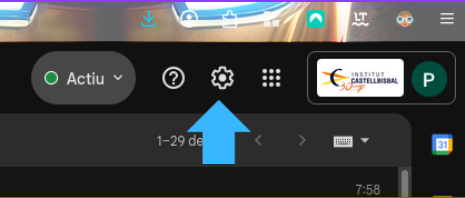
I entered the snail of “Configuration” that is at the top.
Then I entered “Show all setting”
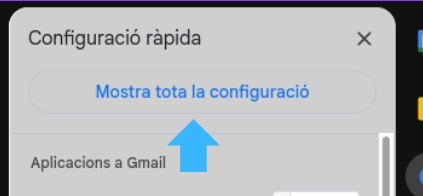
We will appear in the “General” section where I have had to download until I find the “Signature” section where I have been able to create a digital signature that will be written automatically at the bottom of each mail that you send.
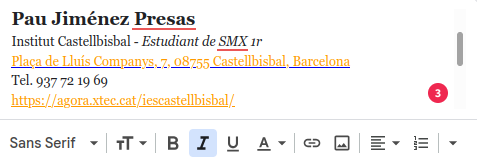
Here he lets many aspects like size and lettering be modified, links and images inserted…
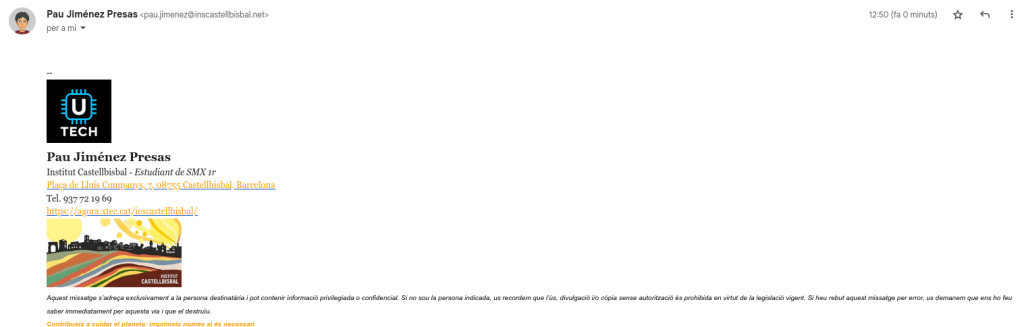
Name and position: Pau Jimenez – Student of Microcomputer Systems and Networks. Clearly identify who you are and your professional field.
Contact: Phone, mail and web are clickable, which facilitates direct communication.
Address: Show the place of study or work (INS Castellbisbal).
Ecological message: Promotes environmental awareness (“Contribute to caring for the planet: print only if necessary”).
Image: Corporate image of the institute and personal logo
Design: Color black and orange (colors of the institute), neat and clear structure.
As he says in my style book I’ve written it all with “Georgia” lyrics
Deixa un comentari